






What Is a Profile?
Profile is a collection of permissions belonging to a group of users. When a specific profile is assigned to a user, that user can use all the permissions detailed in the specific profile.
Within each team, you can define permissions and a specific profile that suits the team’s unique tasks.
The system allows you to define custom profiles and permissions, so each team has permissions suited to its unique activity area.
How to Define a Profile?
To define a permissions profile, click the Settings icon and select Permission Profiles:

Click the + to create a new profile:
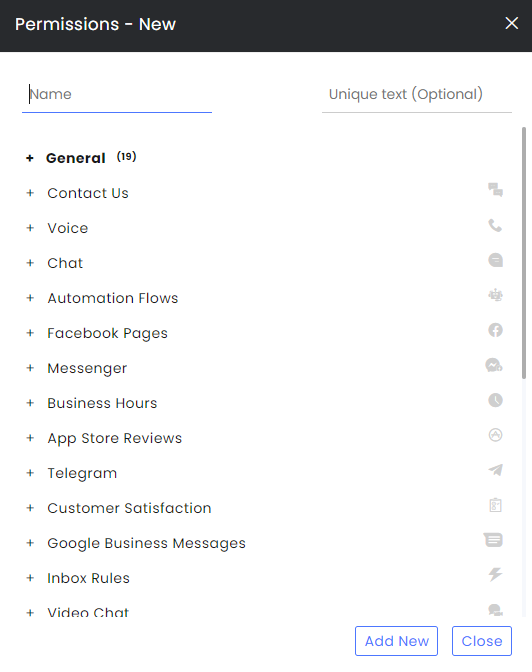
- In the General Permissions section, check the areas that the agents can enter and the actions they may perform.
- In each of the relevant Channels, check the appropriate permission. Click multiple times until you see the needed icon. Checking the main channel (in a box) will include all subchannels under it.
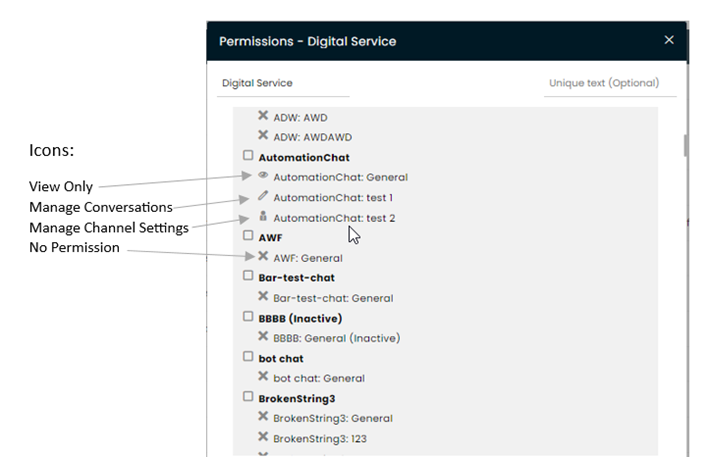
Editing an Existing Profile
- Navigate to Settings >> Permissions Profiles and select the profile you want to edit.
- Make changes as desired.
- There are three options to finish the process:
- Click Save and apply to update the permissions for agents that have this profile.
- Click Save without updating the permissions for the agents that have them. Only new agents will gain the changed profile.
- Click Close to close the permission profile without saving the changes.
Assigning Profiles and Adding Permissions to Agents
- Navigate to Settings > Agents and click on the desired agent initials icon.
- At the agent profile, click the Permission Profile box and select the profile appropriate for this agent:
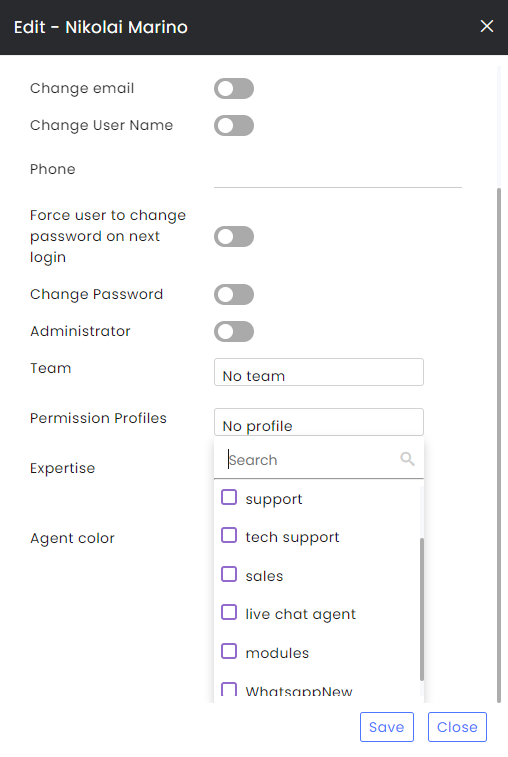
3. To add specific permission, click on the Permissions icon at the end of the line (it will appear after hovering on the specific line) and select the appropriate channels/permissions for that agent:

Flow Builder (Bots) Permissions
- Click the flow builder (Bot studio) permissions guide.