



Google Business Messages. Google has become the primary engine for businesses that are looking to promote their services – 92% of online searches are via Google. Research shows that 1 in 3 product searches (35%) start on Google. Furthermore, 34% of “near me” searches that start on desktop and tablets end in physical store visits.
In today’s digital environment, over 70% of consumers shop on multiple channels. Not just Facebook Messenger, Instagram, or TikTok, also Google’s Business Messages messenger serves as a direct communication channel to service providers. And due to Google’s growing market dominance, it’s time for businesses to adopt it as their primary service channel.
In this article, we’ll explain more about Google’s Business Messages and why it’s becoming a critical service channel. Then, we’ll guide you on how to get started with Google’s Business Messages and provide an exceptional customer experience.
What are Google’s Business Messages?
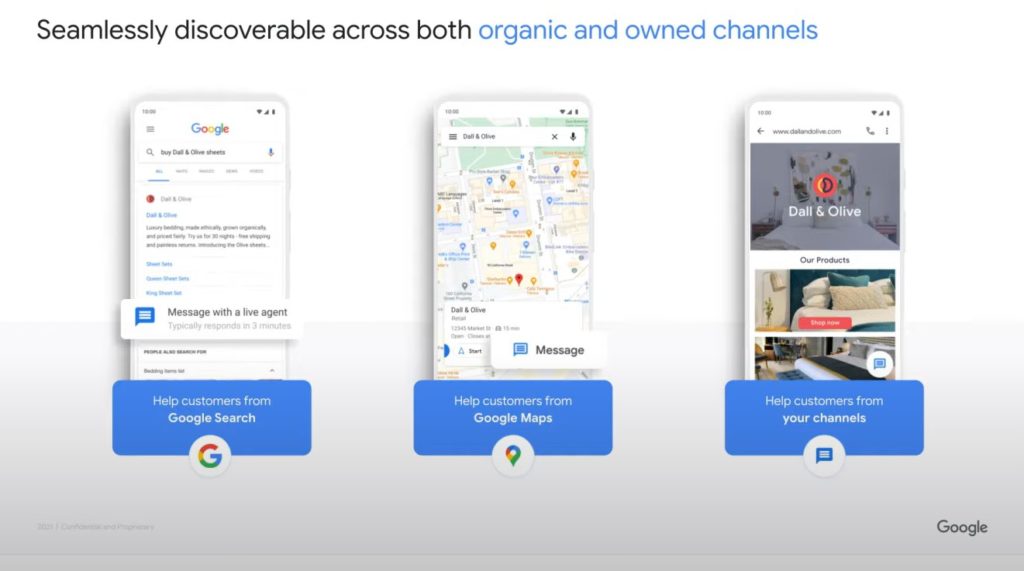
Google’s Business Messages (GBM) is a mobile conversational channel that allows your business to quickly reach new customers searching for you on the Google search engine or Google Maps, increasing your chances of selling.
Once your brand is connected to Google’s Business Messages, you can place messaging buttons within organic Google search results. Customers can click on the chat button and instantly start a conversation with your business.
They can ask questions, get information about products and services or just chat with you without waiting on the phone line. You can receive and respond to customer messages through the Business Messages API and offer your products or services.

Screenshot: Google’s Business Messages.
Why Brands Need Google’s Business Messages?
An easy-to-use service channel like Google’s Business Messages serves customers’ most profound needs – fast and efficient service.
Research shows 90% of consumers expect an immediate response when interacting with businesses, 60% expect it in under 10 minutes. Additionally, 90% of consumers believe customer service is crucial in choosing a brand. And that’s not all, check out these three amazing facts:
When you meet your customers’ needs, you deliver a better customer experience and generate higher sales – 86% of consumers are willing to pay more for a great customer experience.
All data points to one conclusion – any brand needs Google’s Business Messages. But how do you manage it efficiently with all other communication channels?
To do so, you need to unify all your customer service channels to an omnichannel customer communication solution that supports Google’s Business Messages, like CommBox.

How Brands Use Google’s Business Messages
Brands across sectors have adopted Google’s Business Messages as a primary communication channel to enhance their customer service, grow sales and achieved outstanding results.
Levi’s, the international fashion retailer, recognized Google’s Business Messages benefits and now uses it to offer support and sell products directly to consumers. According to Google, Levi’s achieved 85% customer satisfaction rates using Business Messages and discovered that the service generated 30x more store-related questions than web chat.

Another company that leveraged Google’s Business Messages is Albertsons Companies. As the Covid-19 pandemic accelerated the need for information about vaccine eligibility, availability, and appointment booking, Albertsons Companies’ banner pharmacies – like Albertsons, Safeway, and Vons used Google Search and Maps and made this information available through the chat button.

In India, Vi customers can get 24/7 customer service via a chatbot that is integrated with Google’s Business Messages. Customers can check their billing information, activate packs, add recharges and payments, check balances, and more.

Get Started with Google’s Business Messages On CommBox
CommBox is an AI-powered omnichannel platform that allows brands to manage all interactions across channels from a smart inbox. CommBox supports all popular service channels: Google’s Business Messages, Facebook Messenger, Instagram, Telegram, WhatsApp, SMS, email, video, voice, and more.
Commbox easily connects to Google’s Business Messages API, allowing you to get messages sent via Google into your unified inbox and efficiently manage all inquiries across channels.
With CommBox, support agents don’t need to switch channels – they see all interactions in the CommBox inbox, no matter which channel customers sent the message through.
When your business is connected to CommBox, your customers can enjoy a seamless experience no matter what channel they use.

When connected to Google’s Business Messages API, CommBox allows you to:
- Receive notifications from incoming messages.
- Set automated welcome messages.
- Share images with customers.
- Quickly answer customer questions.
- Use chatbots to answer messages automatically.
- Answer customers from both desktop and mobile apps. (Both iOS and Android mobile apps)
- Use rich cards that contain up to four suggested actions and replies.
- Use Carousels that contain a minimum of two and a maximum of ten rich cards.
How to Start Using Google’s Business Messages?
CommBox will assist you in setting up Google’s Business Messages tool and integrating the channel into CommBox’s smart inbox. Then you’ll be able to manage your Google’s Business Messages from CommBox along with all other communication channels. To find out more, get in touch with.

Illustration: Google
How to Set Up a Chatbot for Your Google Business Messages Channel
CommBox’s AI allows you to build smart chatbots for various use cases (customer service, sales, etc), and automate complex processes by setting automation rules.
You can build a chatbot in minutes and automatically communicate with customers across all communication channels: Google Business, WhatsApp, Facebook Messenger, Instagram, and more.
A chatbot you build with CommBox serves your customers across channels in a unified tone and voice while keeping a friendly human-like conversation.
What more can you do with CommBox’s chatbots?
- Be available 24/7 on Google Business or any other channel!
- Manage all customers interactions from a smart central inbox
- Automate repetitive tasks
- Qualify leads and Increase sales faster
- Quickly respond to customers while tracking any conversation
- Get updates directly to your CRM
- Optimize your call centers and reduce customer service costs
The CommBox chatbots:
- Learn from every interaction with your customers and get smarter over time.
- Communicate with other bots and transfer conversations from one Bot to another according to the flow of the conversation while keeping complete transparency from the customer’s point of view.
- Identify types of conversations (sales, customer service, etc) and route a specific conversation to suitable departments or agents.
Conclusion
In today’s digital environment, over 70% of consumers shop on multiple channels. Additionally, over 92% of online searches are via Google, making Google’s Business Messages a mandatory service channel.
Considering these trends, businesses and service providers must adopt an omnichannel communication solution to manage their customer interactions efficiently across all channels.
CommBox unifies all digital communication channels including Google Business, allowing you to receive messages sent via Google into your unified inbox, and manage all inquiries across channels more efficiently.
Additionally, CommBox’s AI allows you to build smart chatbots for various use cases (customer service, sales, etc.), and automate complex processes by setting automation rules. CommBox’s multiple features and capabilities make it a powerful customer communication tool for all types of businesses.
Want to know more?
Schedule your free demo today and connect your Google Business with CommBox.